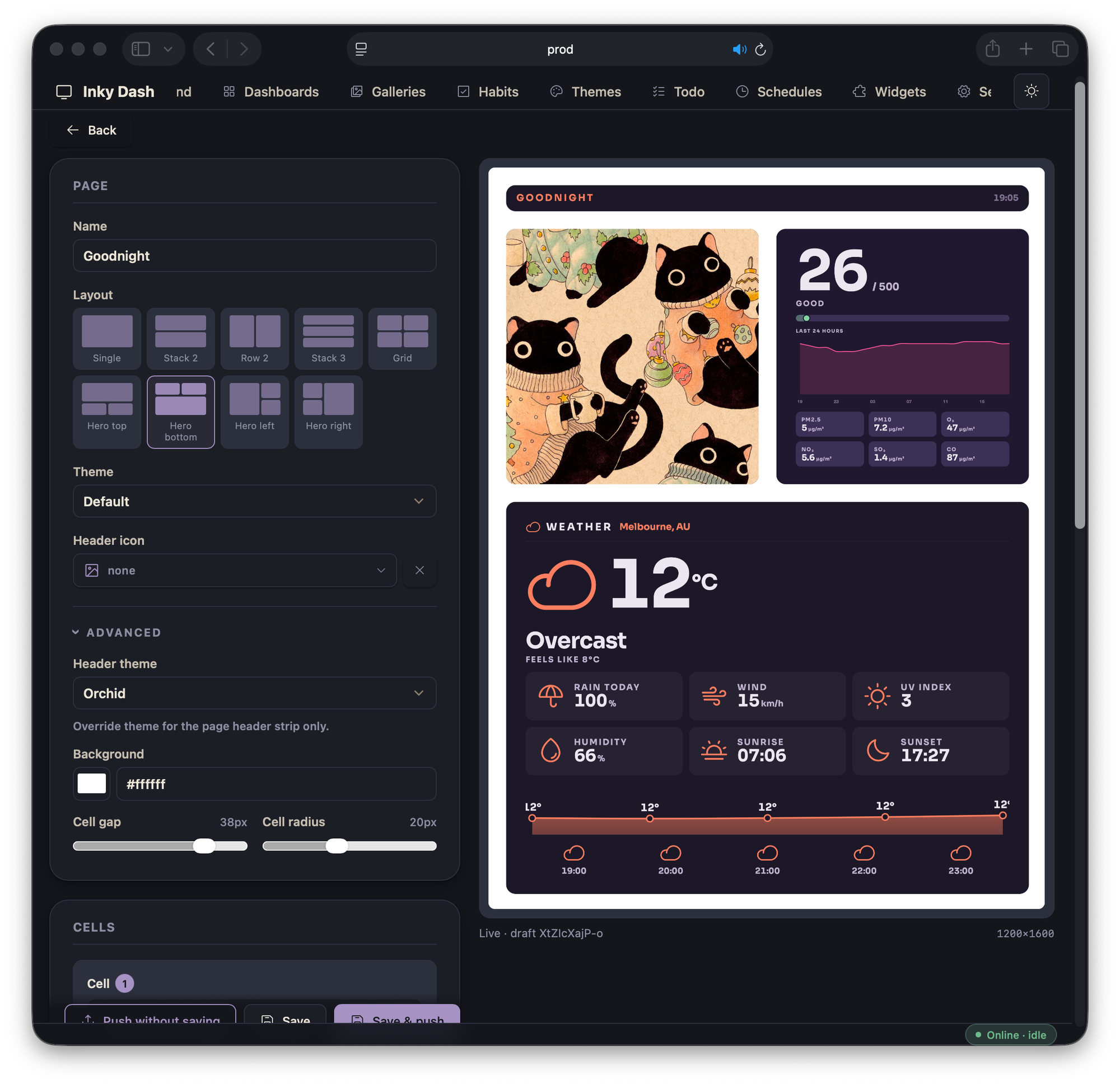
I've had a Pimoroni Inky Impression sitting on my desk for a while — a colour e-ink panel that takes ~30 seconds to refresh and looks like printed paper the rest of the time. I wanted to build something for it: a way to compose what shows up on the panel, not just rotate through a folder of photos.
That turned into Inky Dash — a small Flask companion that runs on my LAN, lets me build pages in the browser, renders them to PNG, and pushes them to the panel over MQTT.
The frame the panel actually lives in is a separate project — still in progress. This post is about the software side.
The stack
Deliberately boring on purpose:
- Flask + Jinja for the admin UI. No SPA, no build step.
- Vanilla JS as ES modules. Each page imports what it needs.
- Headless Chromium via Playwright is the renderer — it loads the same HTML the editor previews and screenshots it at panel resolution.
- MQTT (paho) ships the rendered PNG to a small daemon on the Pi.
- SQLite for push history; JSON files for everything else (pages, schedules, preferences). State you'd want to hand-edit lives in plain text.
- Chart.js is the only frontend dependency. It's vendored, not from a CDN.
No React, no TypeScript, no bundler. The whole admin UI fits in a few hundred KB of JS that browsers cache forever.
What I built
Dashboard editor
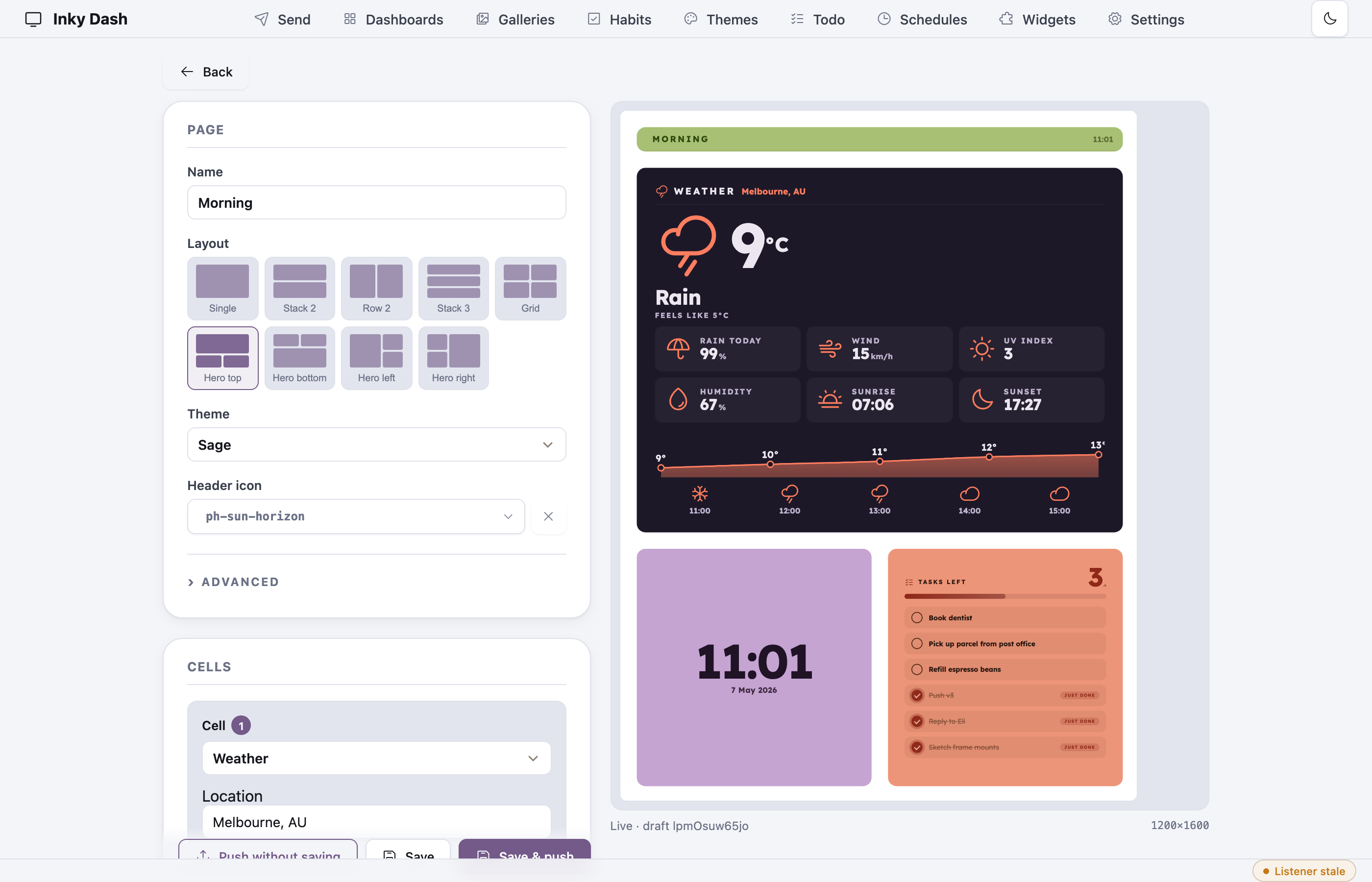
Pick a layout (single, stack, row, hero variants, 2×2), drop a plugin into each cell, theme each cell independently, see the preview update live in the right pane. The preview iframe loads the same /compose/<id> route Playwright will load when it actually renders — so what you see in the editor is exactly what'll end up on the panel. WYSIWYG by construction.
Theme builder
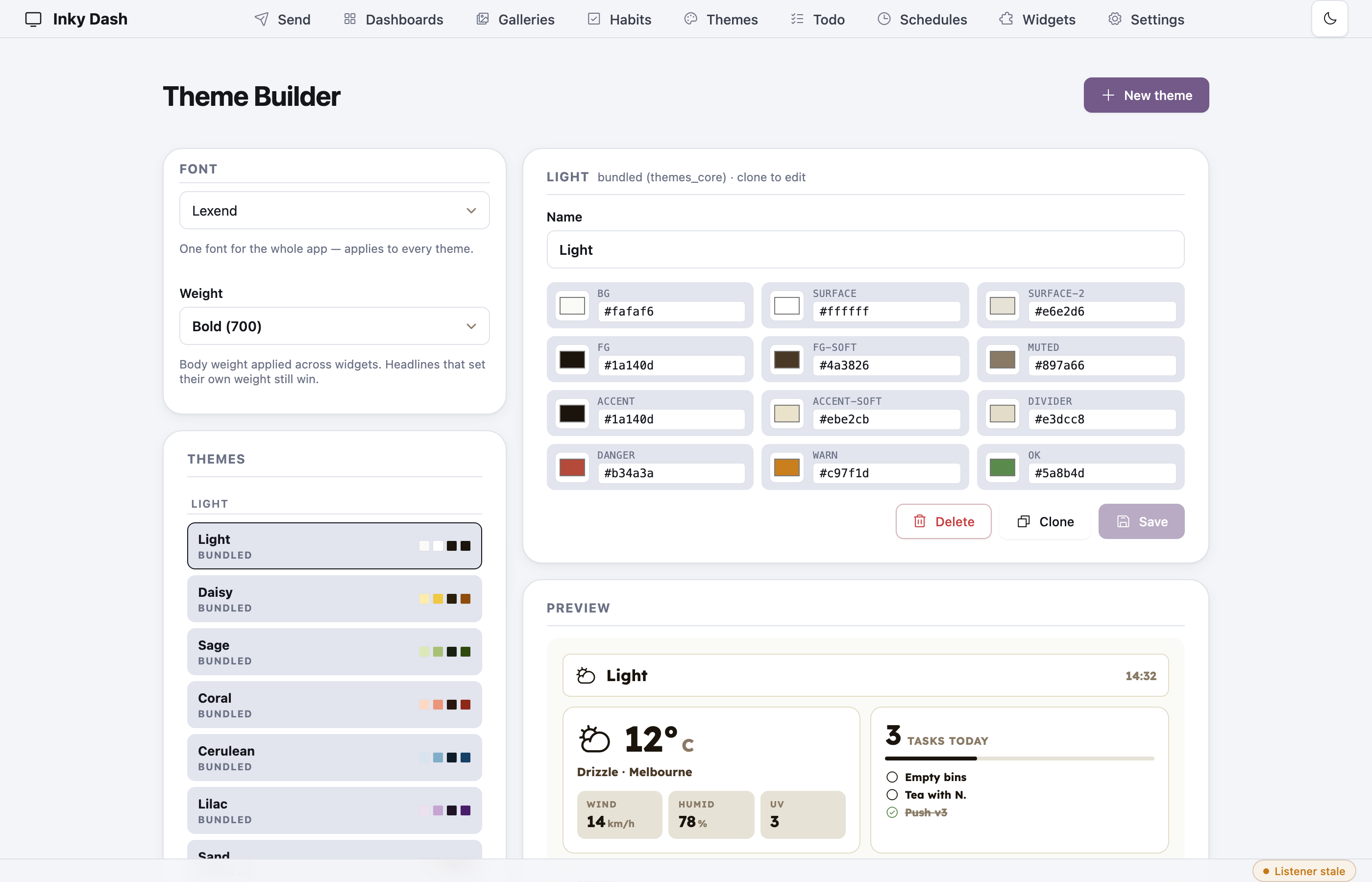
Every theme exposes the same 12-key palette (bg, surface, surface-2, fg, fg-soft, muted, accent, accent-soft, divider, danger, warn, ok). The builder gives each one a colour picker, previews against a real widget on the right, and saves user themes alongside the 19 bundled ones. The font picker on the left is global — pick from 38 bundled woff2 fonts plus a weight selector that filters to whatever weights each font ships.
Schedules
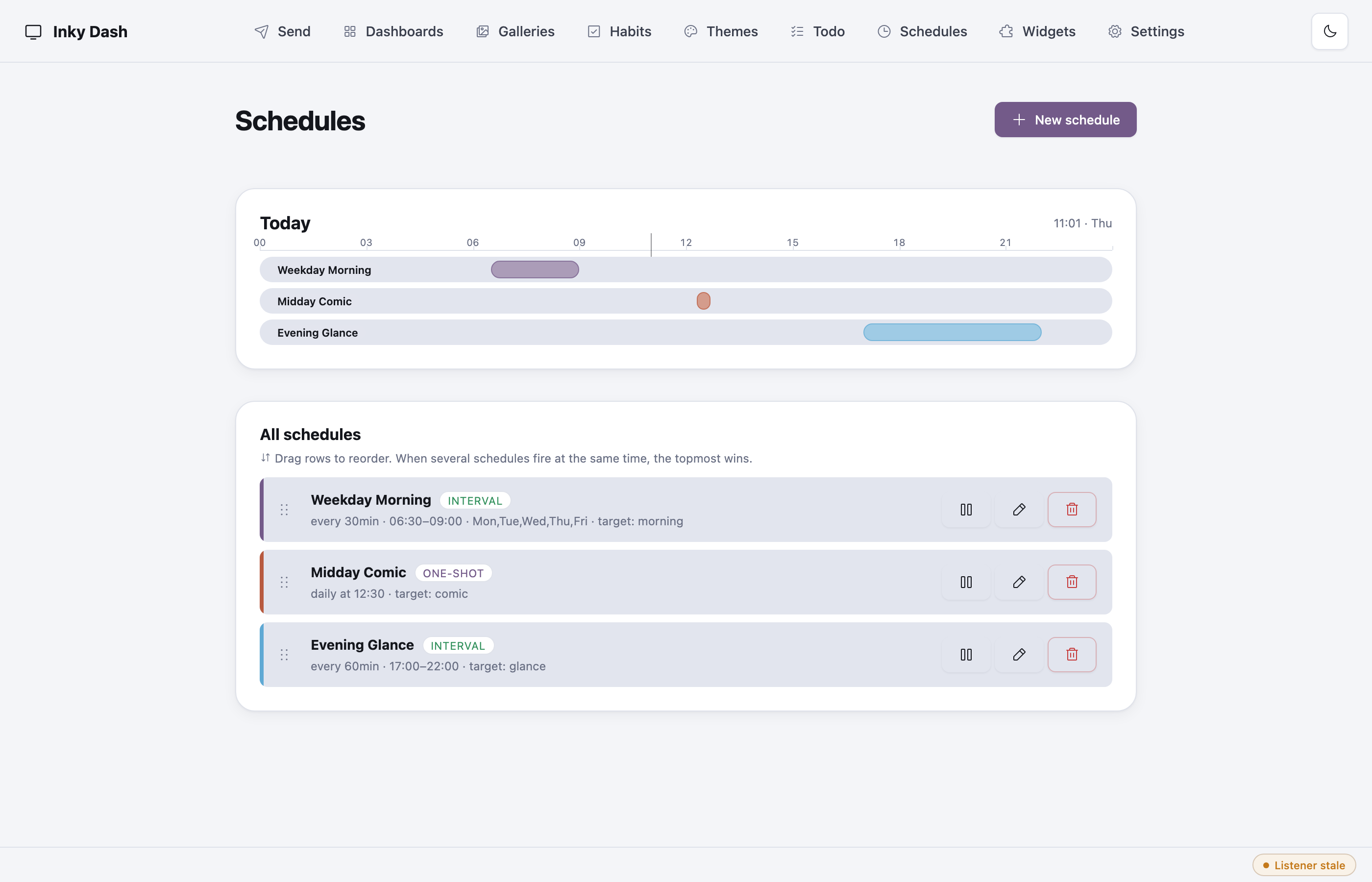
Interval and one-shot schedules with day-of-week masks. Drag rows to set priority — when several schedules fire in the same tick, the topmost wins. The daily timeline at the top shows tonight's coverage at a glance.
Send page
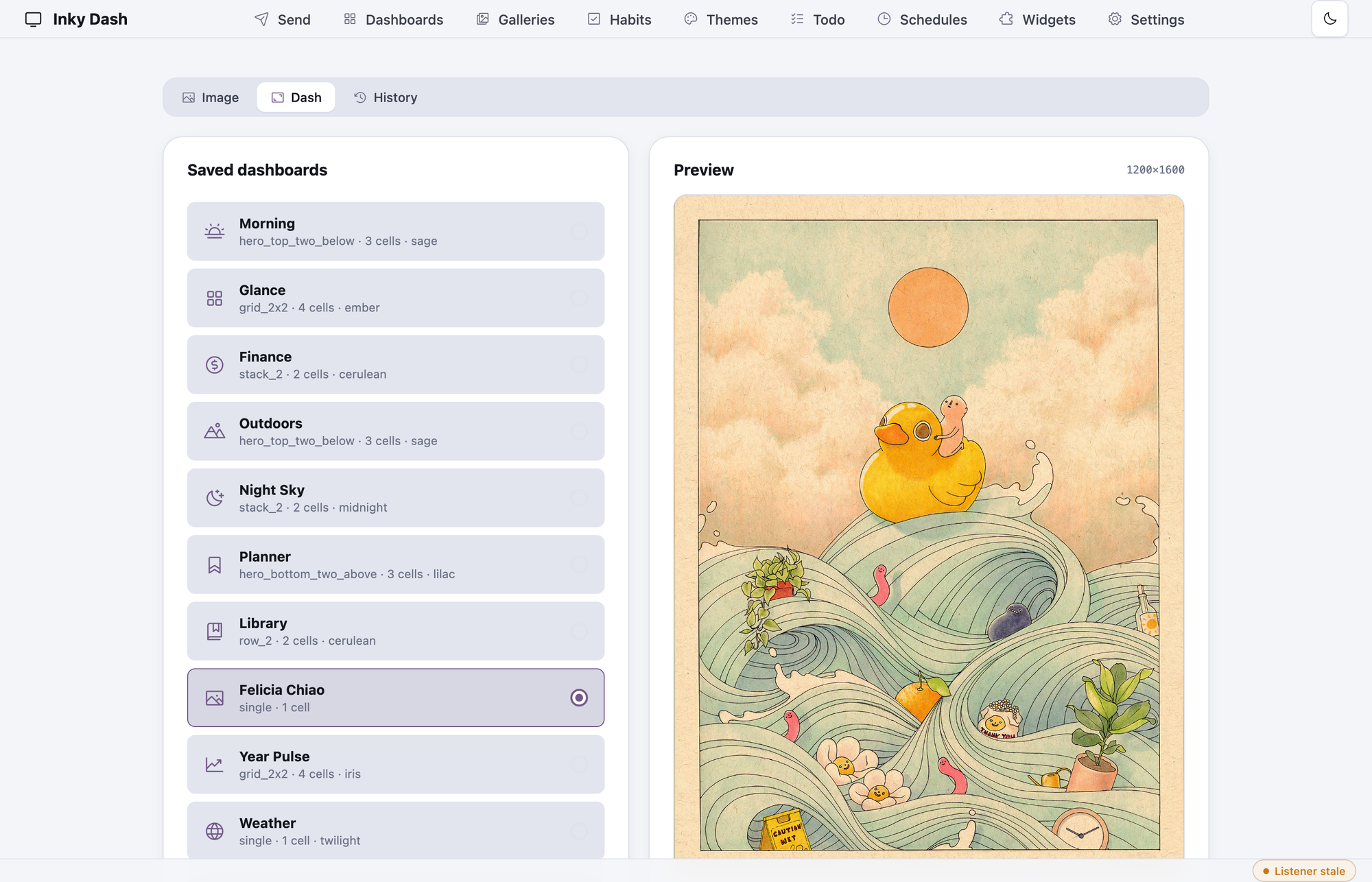
A single push pipeline that accepts files, URLs, live webpages, or saved dashboards. Everything goes through one render → publish path with a panel-aspect preview, history, and replay. The file picker, URL field, and dashboard picker are all just sources feeding the same renderer.
Plugins toggle
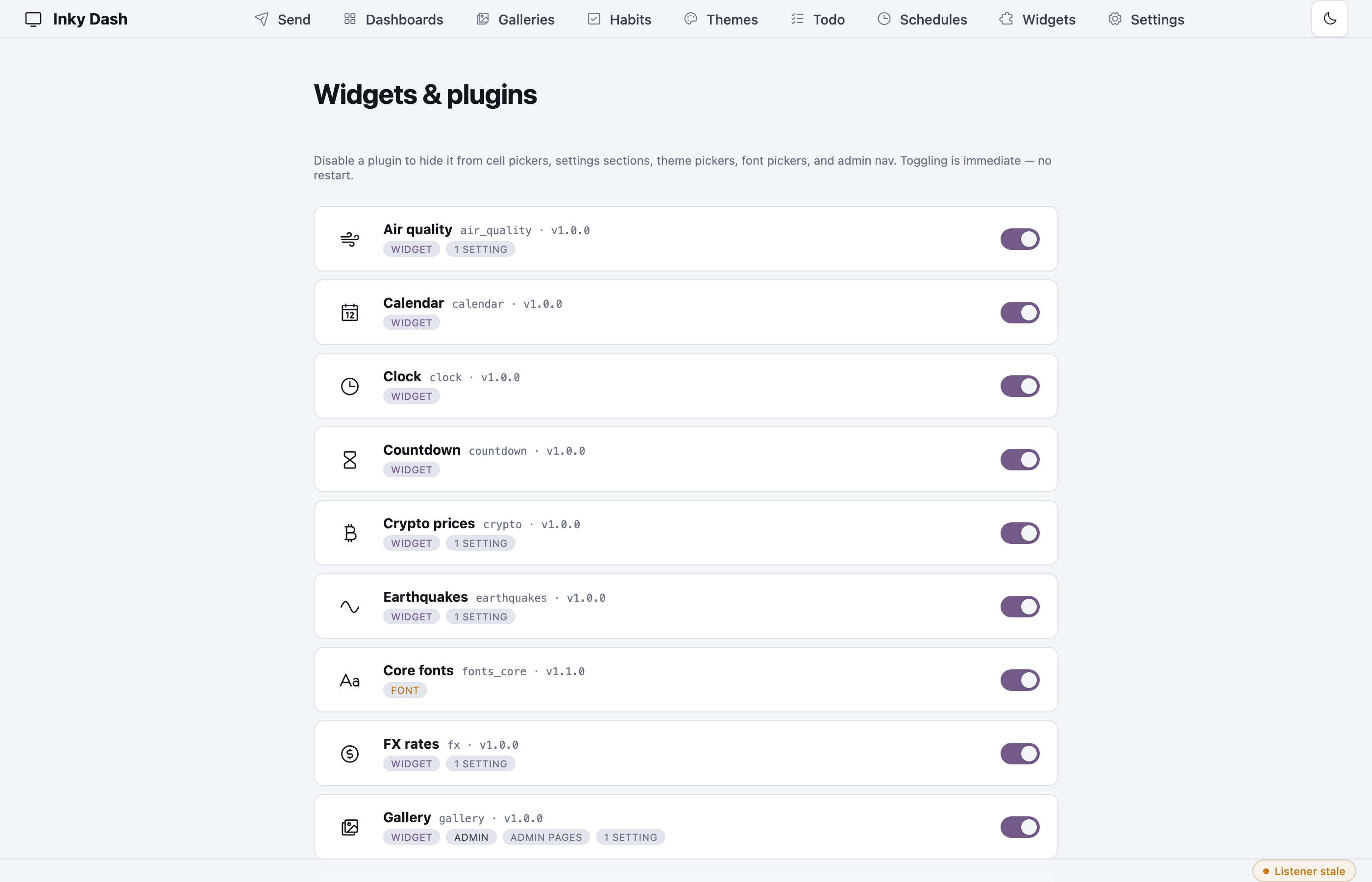
Every plugin is a folder under plugins/. The page lists what was discovered at boot and lets you enable/disable each one. Plugin-specific settings (API keys, options) fold into the merged /settings page automatically.
Architecture
   browser                companion (Flask, this repo)         Pi
   ┌────────┐  HTTP    ┌─────────────────────────┐       ┌──────────┐
   │ /send  │─────────▶│  composer (HTML+CSS)    │       │ listener │
   │ /comp* │          │  plugin loader          │       │  ↓       │
   └────────┘          │  scheduler + push       │ MQTT  │ inky     │
                       │  history (SQLite)       │──────▶│  driver  │
                       │  Playwright ─── PNG ───▶│       │  ↓       │
                       └─────────────────────────┘       │  panel   │
                                                         └──────────┘
The interesting bit is that the editor's preview iframe and the actual panel render load the same URL: /compose/<page_id>. Playwright loads it, screenshots it, and that PNG is what gets pushed. There's no separate "render mode" — the editor IS the renderer, viewed at a different scale. Means I can never accidentally ship a "looked fine in the editor, broke on the panel" bug.
The Pi side is a separate small repo (dmellok/inky-dash-listener) — an MQTT daemon that fetches the rendered PNG and paints it. The wire format is a single JSON object on inky/update:
{
  "url":        "http://inky-dash.local:5555/renders/morning-2026-05-07.png",
  "rotate":     0,        // 0 | 90 | 180 | 270
  "scale":      "fit",    // fit | fill | stretch | center
  "bg":         "white",  // white | black | red | green | blue | yellow | orange
  "saturation": 0.5
}
State goes back on inky/status as a retained MQTT message so the web UI knows what the panel is doing without polling:
{"state": "rendering", "url": "http://...", "started_at": "2026-05-07T07:00:00Z"}
{"state": "idle", "last_result": "ok", "last_duration_s": 31.4, "last_render_at": "..."}
{"state": "offline"}   // set as the MQTT Last Will — broker auto-publishes this if the daemon dies
The plugin system
This is the part I'm happiest with. A plugin is a directory:
plugins/myplugin/
  plugin.json    # manifest: id, kinds, cell_options, settings
  server.py      # optional: fetch(options, settings, *, panel_w, panel_h, preview)
                 #           blueprint() → Flask Blueprint   (admin pages)
                 #           choices(name)                   (dropdown providers)
  client.js      # default export render(host: ShadowRoot, ctx)
  client.css     # scoped to the cell's shadow DOM
Each cell on a dashboard renders into its own shadow DOM, with theme palette CSS variables (--theme-bg, --theme-fg, --theme-accent, …) injected at the root. client.js paints into that shadow root. There's no global stylesheet contention — every plugin's CSS is local to its cell, so two plugins can both define .title without colliding.
server.py is optional. If present, its fetch() is called server-side and the result is passed into render() as JSON. Plugins that need API keys, network access, or local state use it; plugins that just compute from the current time (clocks, year progress) skip it entirely and run pure-client.
Drop a folder into plugins/, restart, the loader picks it up and surfaces it in the editor's cell-type dropdown. Around 30 plugins ship in the box — clock, weather, calendar, todo, news, NASA APOD, gallery, Hacker News, sun/moon, tide, wind compass, air quality, earthquakes, FX rates, crypto, habits, and more — all built against the same contract.
Open source
Both halves are MIT and live on GitHub:
- dmellok/inky-dash — the Flask companion
- dmellok/inky-dash-listener — the Pi-side MQTT daemon
Full documentation in the wiki. The frame I'm building for the panel itself is a separate WIP — I'll post about that one once it's done.